Google Chrome is an important web browser widespread
used by people all over the world because of its high browsing speed, quick response
and user-friendly interface. However, many users complain that Google Chrome
becomes slower than before over a period of time due to multiple reasons. Despite
all this, you can make Google Chrome run faster by the following simple ways.
Look at here and learn How to MakeGoogle Chrome Faster on Windows 10.

Way 1:
Close Unnecessary Tabs from Google Chrome
If you open too many tabs, Google Chrome will
be put under too much pressure and need to work harder than usual. Then the
browsing speed will be slowed down. So in order to speed up Chrome browser, it
is recommended to close some unnecessary tabs or the tabs that you don’t need
any more to relax your Google Chrome. You just need to click the “X” button
behind each tab and only open the tabs that you require.
Way 2:
Update Google Chrome to the Latest Version
If you
are running an older version of Google Chrome, it definitely won’t work as fast
as that in a latest version. So if you want to make Chrome run
faster, you’d better make sure that you’re using the latest version of Google. Normally
Google Chrome automatically updates itself to the latest version in the
background when you close and reopen your computer's browser. But just in case,
you should have a check.
Step
1: Launch your Google Chrome, enter chrome://help
in the search bar to go to Chrome help section.
Step
2: Then you can check for update. Google
will detect whether an update is available or not. If it is available, Google
will update itself to the latest version automatically. If you are told Google Chrome is up to date, it means
that your Google Chrome has already been updated.
Step 3: Relaunch it to check if the browsing speed becomes faster than before or not.

Way 3:
Turn Off or Remove Some Unwanted Extensions
What is Extension? Extensions refer to small
programs which can be added to Chrome and let you do more. In order to improve Google Chrome performance and speed
up page loading, you can turn off or delete some unwanted extensions from
Google.
Step 1: Open Google Chrome on your computer.
Step 2: Go to the three dots at the top right of
the interface and then click More
tools>Extensions.
Step 3: Then you can choose to disable the
extension or click the Remove button
to delete unwanted extensions.

Way 4:
Stop Unwanted Tasks from Task Manager
There may be many unwanted tasks running on your Google
Chrome which occupies a lot of resources but you don’t know or you just ignore
this point. This will also slow down your Google Chrome’s performance. You need
to stop them to speed up your browser.
Open
your Google Chrome, go to the three vertical
dots>More tools> Task Manager,
select the tasks that you want to stop, and then click End process.

Way 5:
Use a Prediction Service to Load Pages More Quickly
There
is another tip on how to speed up Google Chrome on Windows 10. That is to turn on
network action predictions, which can make Google Chrome open webpages faster.
Step
1: Click the three vertical dots at the top right corner and then choose Settings.
Step
2: Expand Advanced in the left
panel, select Privacy and security
and turn on Use a prediction service to
load pages more quickly.

Way 6:
Clear Chrome Cache and Browsing Data
You
need to regularly clear Chrome cache and browsing data to maintain a good
performance. Here is the guidance:
Step
1: Enter chrome://settings/clearBrowserData
with your browser.
Step
2: Then the window of “Clear browsing
data” will pop up. You can set the Time
range to All time to clear more
data and then click Clear data.

When
you find your Google Chrome has slowed down, you can clean up computer to check
if there is any harmful software on your computer and remove it in order to
speed up your Chrome. And you can also choose to reset your browser to the
default settings to fix the issue. No matter which way you select, first of all
launch your Google Chrome, click More
(the three vertical dots)>Settings> Advanced>Reset
and clean up. And then go on Way 7 and Way 8.
Way 7:
Find and Remove Harmful Software on Your Computer
To
find and remove harmful software for your computer, you should:
Step
1: Under the section of Reset and clean
up, choose Clean up computer.

Step
2: Click the Find button so that Chrome
can find harmful software on your computer and remove it.
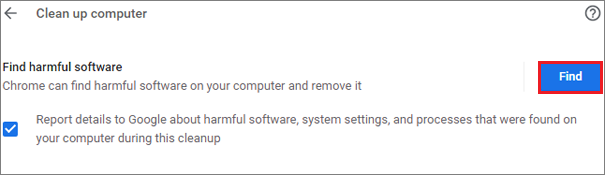
Step
3: Then Google Chrome will start to check for harmful software for your
computer. If there is no malware, you will be prompted “No harmful software found”. If some malwares are found out, click Remove to remove them.
Way 8:
Return Google Chrome to the Default Settings
To
restore Google Chrome settings to their original defaults, you should:
Step
1: Click the option of Restore settings
to their original defaults under the part of Reset and clean up.

Step
2: Click Reset settings to confirm
to reset the Google Chrome.

Related Articles:
- How to Lock Google Search Engine Home Page
- 6 Ways to Speed up Google Chrome
- How to Fix Google Chrome Not Responding in Windows 10
- Fixed-Chrome Sync Bookmarks Not Working